Peer code review
Lesson objectives
Summarize code review best practices
Demonstrate code review on a pull request
Code review best practices
Why review code?
Code review, like peer review, enhances the quality of the work being submitted. All involved parties are collaborating to improve the final product of the pull request.
When performing code review, you are using your expertise to weigh in on a contribution. You aren’t going to have expertise on everything, but your experience with the code and with using it is relevant and valuable.
As a person getting code reviewed: appreciate the reviewer taking time to give you feedback on your work! They are invested and interested in what you’re contributing.
Three perspectives
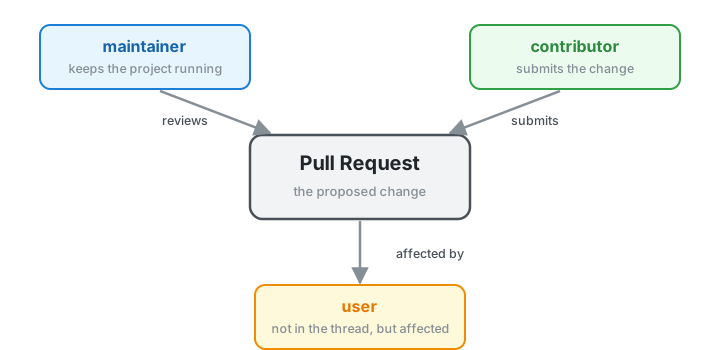
maintainer — a person who keeps things running in a software project. Sometimes maintainers aren’t focused on new features, but instead on overall project infrastructure and usability.
contributor — a person submitting a PR, issue, or feedback to a project. They may have never interacted with the project, or they may do so frequently.
user — people who use the code but don’t contribute upstream. Think about how changes in your code might affect these people, since they’re often not weighing in during code review.
What is code review?
A structured back-and-forth to improve a change before it lands on main:
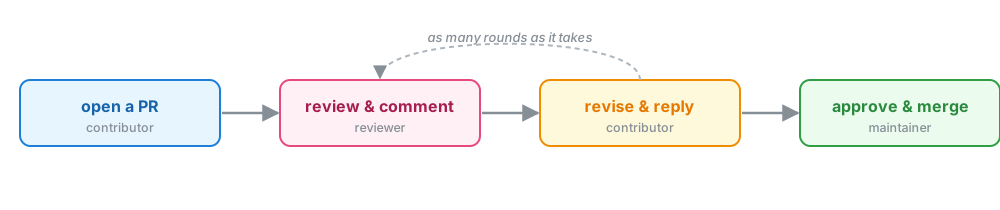
I like this description from GitLab.
Code review as a reviewer
My approach in a review
Read the PR description. What does the author want this code to do? Is it useful and applicable to the code it’s being submitted to (is it in scope)?
Read the documentation submitted with the code. Do I understand how to use it now? Is there anything ambiguous that could be enhanced by clarification? Are there docs missing that need to be added?
Look through the code. Do I follow the logic of what’s being done? I ask questions if I don’t.
Check the tests. Have tests been added for any new features? Do they cover the scope of the new feature? Do they help me understand the code in any way?
Consider the user. Is the API of the code changing from what already exists? Will it impact users significantly?
Suggest constructive improvements. Do I see a lot of repeated functionality that can be put into a single function? Do I see a place where a design pattern could be used? I try to add suggestions for improvement as code snippets.
Try to use the feature. I don’t always do this, but for new features I do. Do I run into any errors when I use it? Does it make sense in my workflow?
I also like to use a good code review checklist so I don’t forget things. Here’s the one my group uses: arfc.github.io/manual/guides/pull_requests
Other considerations
- When you accept the code, it’s possible the contributor will not return. If you’re the maintainer of the project, is this code you are comfortable maintaining moving forward?
- Adding dependencies should be done mindfully.
- If you notice something you’d like changed that isn’t directly related to the PR improvement, open an issue and suggest it as a later fix.
Dos in code review
- Thank the contributor for their contribution
- State what things you particularly like about what was submitted
- Be positive whenever possible
- Ask questions about things you’re confused about — you’re probably not the only one
- If doing multiple rounds of review, try not to let things stagnate
- Use suggestions to show your thought process in code changes
Don’ts in code review
- Nitpicking can really set the tone of a review. Is this small thing really important to the code, or is it personal preference?
- Don’t reject code for stylistic or small changes. This is very demotivating for a contributor.
Doing it on GitHub
Anatomy of a PR review
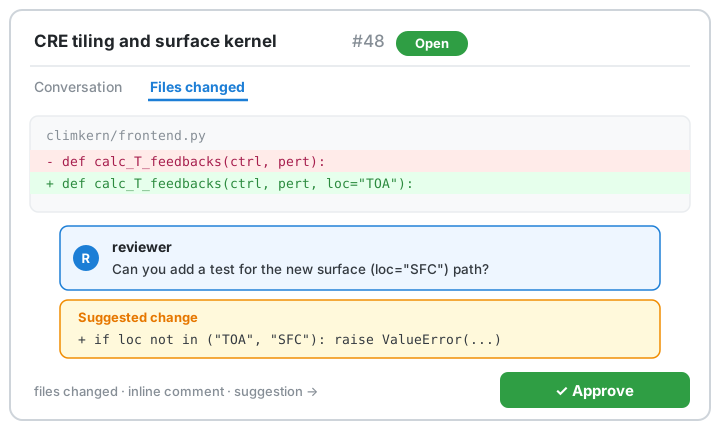
A lot lives on one screen — the next slide names the pieces you’ll actually click.
GitHub’s review tools
- Files changed — read the full diff; click a line number (or click-drag a range) to comment.
- Inline comments — pin feedback to exact lines so the context is unambiguous.
- Suggested changes — propose the precise edit; the author applies it with one click and keeps authorship.
- Start a review, then submit — batch your comments and send them together as Comment, Approve, or Request changes (one notification, not a dozen).
- Resolve conversation — collapse a thread once it’s handled, so re-review stays focused.
A suggested change is just a fenced block in a comment — GitHub turns it into a one-click commit:
```suggestion
kern = make_clim(ctrl, pert)
```
Tips for smoother reviews (and development!)
Your reviews are there to enhance the code that was submitted, for other maintainers, developers, and users. You are collaborating with the author.
Using a linter and formatter means that reviews avoid style bikeshedding.
Having good test coverage and CI means that a new contributor gets automatic feedback on how their code fits into your project.
This also allows code reviewers to focus on code readability and applicability, rather than helping the author debug.
Having good developer documentation (what linter and formatter does your code use? what is your docs style?) helps make the contributor experience a bit less iterative.
Having your issue tracker with clearly described issues helps people other than you understand what’s going on in the project.
Labeling issues with things like “good first issue”, and what type of fix the issue is (e.g. documentation, testing, or something feature-specific), means potential contributors can more easily choose a contribution they are comfortable with. This also ensures the contribution somebody addresses from the issue tracker is relevant to the project.
Consider having a project description in your README. What is the purpose of your code? What is it? What is it not?
A few more things
If you know the contributor and you have done a few rounds of review, consider scheduling a call or sitting down with them to try to resolve things.
Code review as a contributor
Getting your code reviewed
Getting your own code reviewed can be exciting — but it can also be a little nerve-wracking.
Let’s talk a bit about the process of responding to a code review.
My approach
- Read through the reviewer’s comments. Consider their perspective as I read. If I don’t understand a comment, I ask a question as a reply to that comment.
- Answer reviewer questions, if there are any.
- Incorporate code suggestions I like through the GitHub interface — this helps preserve authorship of their contributions.
- Make code changes locally and push them to my feature branch. Address review comments in separate commits to help split things up.
- Notify the reviewer once I’ve addressed all comments and all open discussions have been resolved.
AI-assisted review
A first pass, not the last word
Tools like GitHub Copilot and Claude can now pre-review a PR — summarizing the diff, flagging obvious bugs, and suggesting tests.
Used well, they’re a first pass that frees humans for the judgment calls:
- Great for: catching typos, missing edge cases, “did you add a test?”, summarizing a large diff
- Still a human’s job: is this in scope? is the science right? is this an API you want to maintain?
The bot is a reviewer, not the reviewer. Treat its output like any other comment — weigh it, don’t rubber-stamp it.